
CSV to video tool for sales
Turn a Spreadsheet Into Hundreds of Personalised Videos You have a CSV full of leads. Names, companies, job titles, maybe a website column. Now you want to send each person a video that feels like yo…
Turn a Spreadsheet Into Hundreds of Personalised Videos
You have a CSV full of leads. Names, companies, job titles, maybe a website column. Now you want to send each person a video that feels like you made it just for them. Recording hundreds of clips by hand is not an option.
That is the exact job MailMoo does. Drop in your spreadsheet, and it produces one personalised video per row. Think of it as a csv2video tool built for sales.
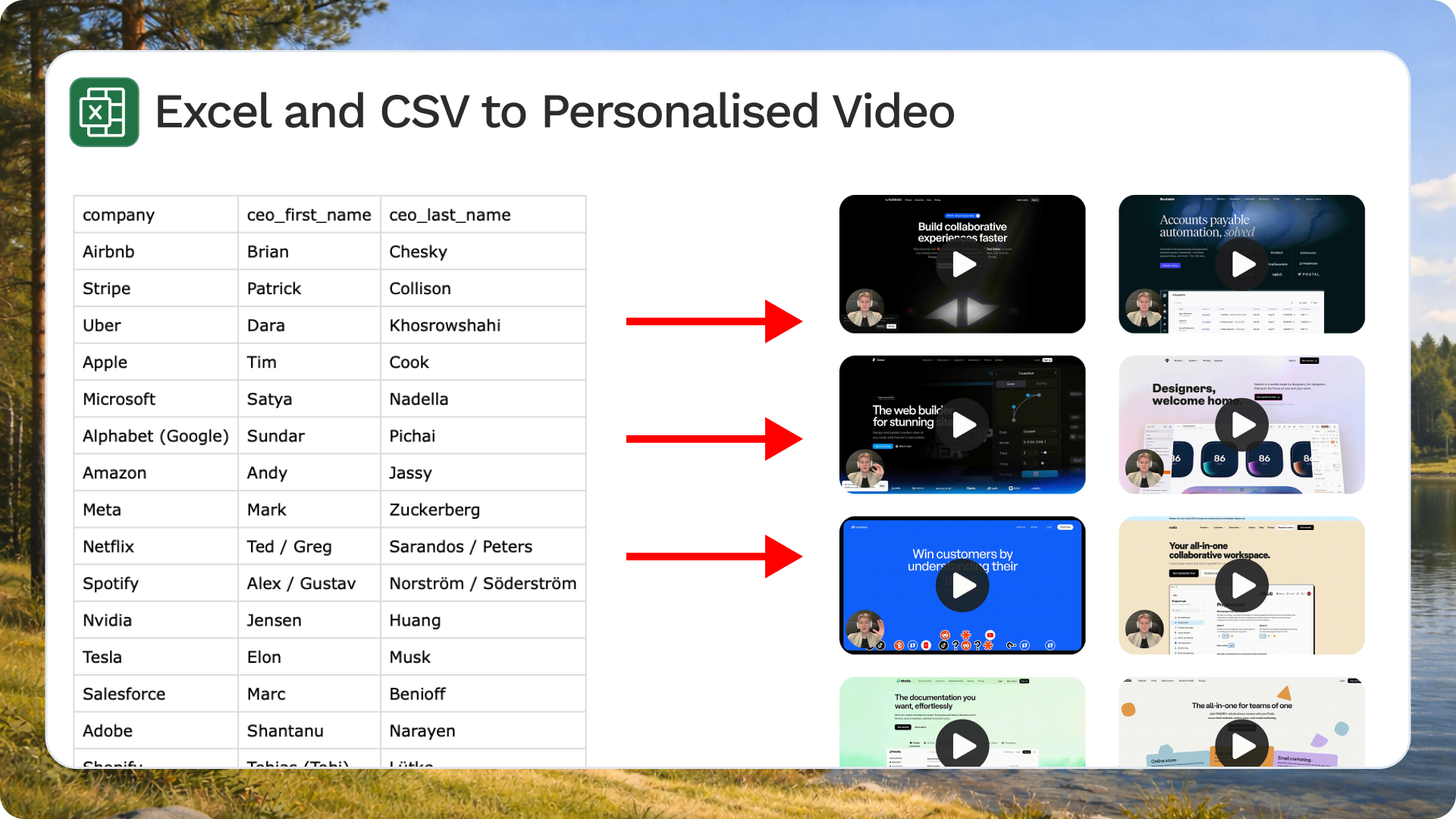
How CSV to Video Works
The idea is simple. Each column in your CSV becomes a variable. Each row becomes a rendered video.
You record one base video. Inside it, you drop in dynamic elements pulled from your data:
- The recipient's name shown on screen or spoken.
- Their company website playing in the background of your clip.
- Audio variables so the intro says the right name out loud.
MailMoo renders a unique version for every row. A 500-line CSV gives you 500 videos, each addressed to a real person.

This is what makes cold outreach feel warm. The prospect sees their own site on screen and hears their name. It reads as effort, not a template.
More Than Video: Slideshows and Landing Pages
A personalised video is the hook. But MailMoo goes further than a single clip. The same CSV data can power three types of content.

Personalised slideshows
Slides update per lead. A slide can read "Outcomes for {{industry}} teams like {{company}}" and fill in the real values. Good for short VSLs where you want structured proof, not just a talking head.

Personalised landing pages
Each video sits on its own page, branded for that prospect, with a "book a meeting" button right below it. One link per lead, no clutter.

Sending the Videos
Rendering is half the work. The other half is getting the video in front of people.
MailMoo embeds each video as a thumbnail or animated GIF in an email, or attaches it to a LinkedIn message. The moving preview catches attention in a crowded inbox.

The Takeaway
If you have data in a spreadsheet, you have the raw material for hundreds of personalised sales videos. Upload the CSV, record one base clip, map your columns, and let MailMoo render the rest. That is csv2video in practice: personal outreach at the volume a template gives you, without the template feel.


